
1. Understanding your results
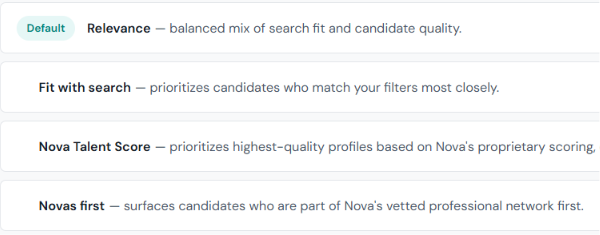
Once your search runs, Nova returns a ranked list of candidates. Each card shows the candidate's current role, location, years of experience, an AI-generated summary, and match indicators.
2. Reviewing a candidate's profile
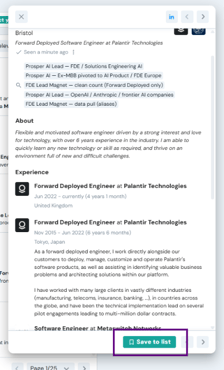
Click on any candidate card to open their full profile. You'll see their complete work history, education, skills, and a direct link to their LinkedIn profile.
3. Adding candidates to a shortlist
When you're ready to save a candidate
- Open a candidate's profile and click "Save to list".
- A panel will appear with your existing shortlists — select one or click "+ Create new shortlist" to start a new one.
💡A candidate can belong to multiple shortlists If a candidate fits more than one open role, you can add them to multiple shortlists simultaneously.
✨Name your shortlists clearly
Shortlists connect directly to your outreach campaigns. A clear name by role or project (e.g. "Senior PM – Madrid Q3") saves time when you're ready to launch a campaign.
4. Managing your shortlist
Once you've added candidates manually, open the Lists section from the left-hand menu and select the shortlist you're looking for.
Inside each shortlist, you'll find an overview of all the saved candidates, including their key information. From here, you can:
- Review the candidates you've saved.
- Remove candidates who are no longer relevant.
- Keep your shortlist organized before starting outreach.
💡 Shortlists are the starting point for Outreach campaigns. Once your shortlist is ready, you can use it to create an outreach sequence and start contacting candidates directly from Nova.
5. Importing or exporting a shortlist (Optional)
Nova also lets you import or export shortlists, making it easy to continue working with existing candidate lists or use your data outside the platform.
Import candidates to a shortlist
If you already have a list of candidates, you can import them directly into Nova.
- Open your shortlist.
- Click Import candidates.
- Upload a CSV file (you can download the template provided) containing the LinkedIn URLs of the candidates you want to add to the list.
This is a quick way to prepare an existing candidate list for an outreach sequence in Nova.
Export your shortlist
You can also export any shortlist you've created in Nova for use outside the platform.
Exporting candidates consumes credits,
💡 Whether you import candidates or build your shortlist manually, your shortlist is ready to be used as the audience for your outreach sequence.