
Bulk Actions & Improved List Management
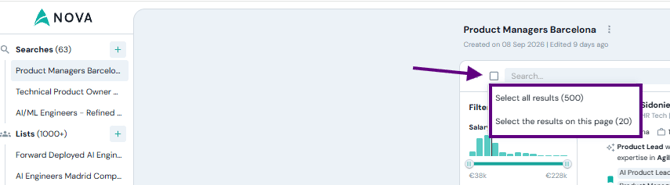
Multi-select is now available across search results, lists, and sequences. Select as many candidates as you need — one by one or all at once — and act on them in a single click.
What you can do with a selection:
- Save to list — Add all selected candidates to an existing list or create a new one.
- Export to CSV — Download the selection for reporting or external use.
- Mark as seen / not seen — Keep your review status up to date.
How to use it:
- Hover over any candidate row — a checkbox will appear on the left.
- Select individual candidates or use the header checkbox to select all on the page.
- Choose your action from the action bar that appears at the bottom of the screen.
Filter Lists by Owner
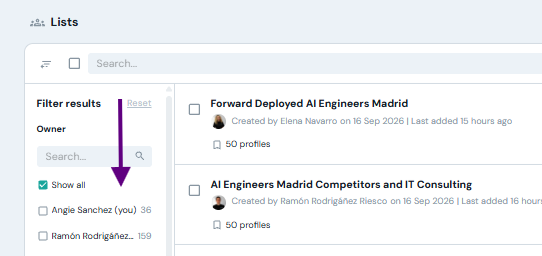
In teams with many recruiters, the Lists section can get crowded quickly. You can now filter lists by who created them — see only yours, or focus on a specific teammate's lists.
How to use it:
- Go to Lists in the left sidebar.
- Open the filter panel and select one or more owners.
- Your own lists appear first, marked(you), for quick access.
Delete searches, Lists and Campaigns
You can now delete searches and outreach sequences directly from their menus, the same way lists already worked. Bulk deletion is also available — select multiple items and remove them all at once.
Every deletion asks for confirmation before anything is removed. This action is permanent and cannot be undone.
How to use it:
- Open the three-dot menu (⋯) next to any search, list, or campaign.
- Click Delete and confirm.
- For bulk deletion: select multiple items using checkboxes, then choose Delete from the action bar.
Good to know:
Deleting a search does not remove the "viewed" marks on candidates — those stay so your team doesn't contact the same person twice.
However, deleting a campaign means any pending outreach in that sequence will not be sent, and conversations will lose their AI reply suggestions.