
Run searches, build shortlists, and launch campaigns without opening the platform.
💡 What is MCP?
Is an open standard that lets AI assistants connect to external tools and services.
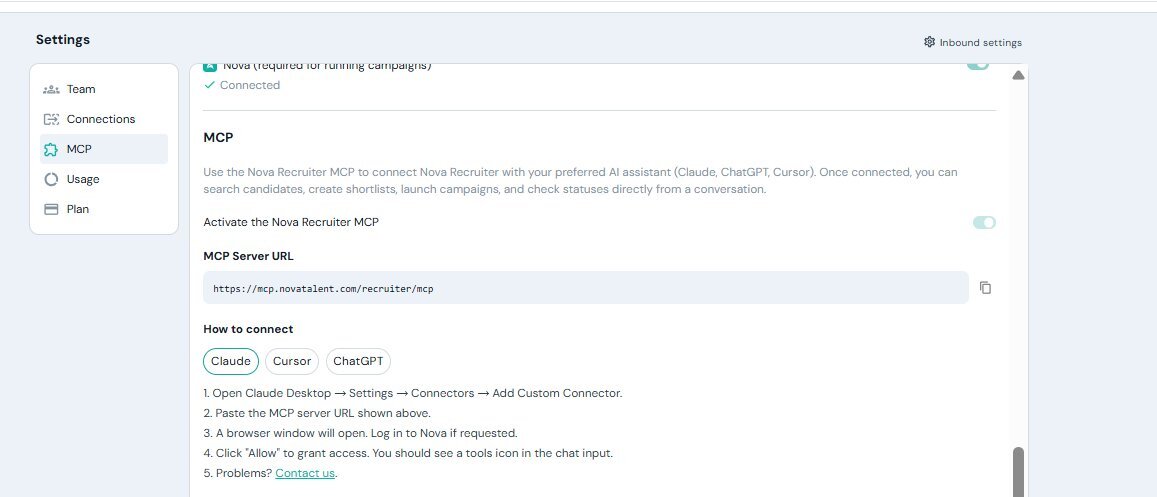
Supported AI clients
The Nova Recruiter MCP Server currently supports:
- Claude
- ChatGPT
- Cursor
Each client has its own setup process, but all of them use the same MCP Server URL.
Before you start
Before connecting the MCP Server, make sure you have:
- A Nova Recruiter account on a Starter, Growth, or Enterprise plan.
- A supported MCP client.
- Access to your Nova Recruiter account.
MCP Server URL
Use the following URL when configuring your MCP client:
https://mcp.novatalent.com/recruiter/mcpConnect the MCP Server
Although the setup may vary slightly depending on your AI client, the process is generally the same.
- Open your AI client (Claude, ChatGPT, or Cursor).
- Go to the MCP or Connectors settings.
- Add a Custom MCP Server.
- Paste the Nova Recruiter MCP Server URL.
- A browser window will open automatically.
- Sign in to your Nova Recruiter account if prompted.
- Click Allow to authorize the connection.
- Return to your AI client and verify that the Nova Recruiter tools are available.
🔒 Secure authentication
Nova uses OAuth to securely authorize your AI assistant.
Your login credentials are never shared with the AI client, and you can revoke access at any time.