
💡What the Shortlist Agent does
It evaluates every candidate in your results against your mandatory and desirable criteria, calibrates itself with your feedback on 3 sample profiles, then builds the shortlist automatically. You review everything before it goes ahead.
How to activate the Shortlist Agent
There are two ways to start:
Option 1 — From the search prompt
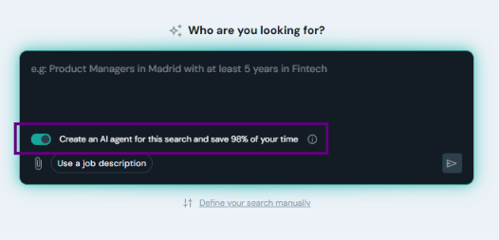
Before running the search When describing your search, enable the toggle "Create an AI agent to shortlist the best candidates" before submitting. The agent will activate automatically once results are ready.
Option 2 — From the results page
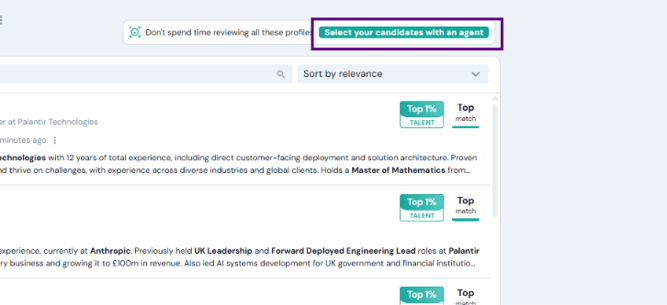
After running the search Click "Shortlist candidates with an agent" in the top right corner of your results — available at any time.
How the AI Agent works — step by step1
1. Review the criteria
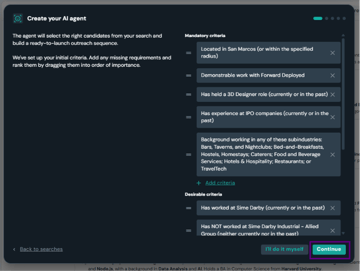
A setup screen will appear showing the mandatory and desirable criteria the agent has extracted from your search. Review them carefully before the agent starts.
- Check each criterion — you can edit, remove, reorder, or add criteria at this stage.
- Make sure mandatory criteria are the true dealbreakers. Desirable criteria rank candidates higher but don't exclude anyone.
- Confirm when ready to move to the next step.
2. Evaluate 3 sample candidates
Before running the full shortlist, the agent presents 3 candidate profiles for you to calibrate it. For each one, decide whether they are a good match.
✅ You accept a profileConfirms the agent is on the right track. It will look for more candidates like this one.
❌ You reject a profileYour feedback becomes a new mandatory criterion — so every subsequent candidate already meets it.
✨Use all 3 samples to calibrate
You have up to 3 sample profiles. Each rejection sharpens the agent's criteria, so the more specific your feedback, the better the final shortlist.
3. Set your shortlist size
After evaluating the 3 samples, the agent will ask: "How many candidates do you want to manage?"
- Use the slider to set the maximum number of candidates for the shortlist — up to 100.
- Click "Put the agent to work" to start the full shortlist run.
4. The agent builds your shortlist
The agent reviews the full result set and builds your shortlist automatically. You can watch it work in real time from the Agents section in the left sidebar.
💡Each candidate comes with an explanation The agent doesn't just add candidates — it tells you why each one was included, so you can make informed decisions when reviewing the final list.